__NUXT_DATA__: reverse engineering Nuxt 3’s serialization format
What I found when I opened a Nuxt page’s source
I was building an MCP server to interact with a freelance marketplace. The goal: let an LLM fetch profiles, skills, availability — without going through a public API, because there isn’t one.
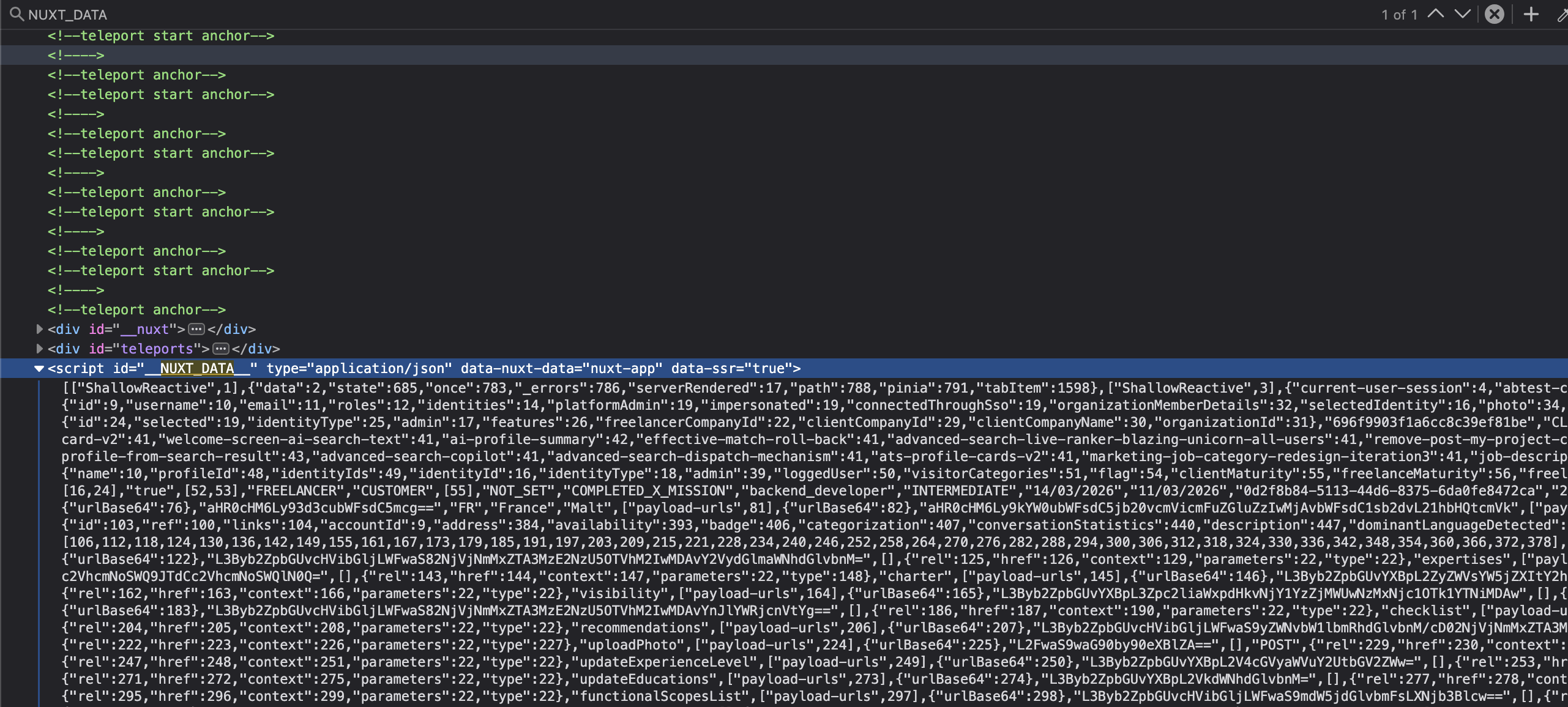
First move: look at the profile page HTML and pull out what I need. I open the source in the browser, search for the name, job title, skills… and I find this:
<script id="__NUXT_DATA__" type="application/json">
  [0,1,2,3,4,"Alice","full-stack",42,{"name":5,"job":6,"age":7},...]
</script>
Several thousand entries. Numbers everywhere, a few strings scattered throughout, objects with numeric values that make no sense at first glance. My first instinct: look for the docs. Nuxt must document this somewhere. Spoiler: it doesn’t.
I spent a solid chunk of time staring at that array wondering why name is 5 in an object that represents a human profile. But 5 isn’t a value. It’s an index — a pointer. The actual value lives somewhere else in the array, at index 5.
Here’s what this format actually is, and why parsing it isn’t straightforward.
A flat array where everything references everything else by index
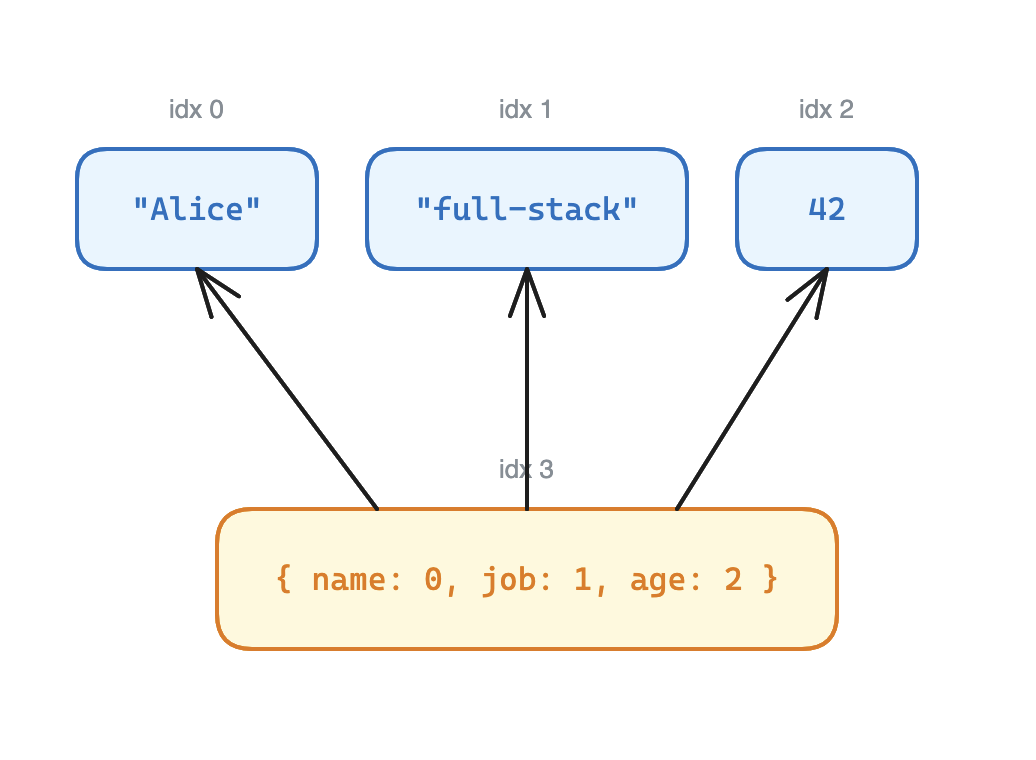
devalue — the library Nuxt uses to serialize SSR state — doesn’t store objects like plain JSON. Instead, it flattens everything into a single array and replaces each value with an index pointing to another entry in that same array.
Concretely, the object { name: "Alice", job: "full-stack", age: 42 } becomes:
["Alice", "full-stack", 42, { "name": 0, "job": 1, "age": 2 }]The object sits at index 3. name: 0 doesn’t mean name equals 0 — it means “the value of name is at index 0”, which is "Alice". Same for job (index 1 → "full-stack") and age (index 2 → 42).
The reason is simple enough: if the same object is referenced in 15 places across the app, it’s only stored once, and all 15 references point to the same index. Zero duplication, perfect deduplication — but completely unreadable as-is.
To extract anything, you first need to write a recursive resolver that follows these pointers.
function resolve(idx: number): unknown {
  const val = raw[idx];
  if (typeof val !== "object" || val === null) return val;
  if (Array.isArray(val)) {
    return val.map((item) => (typeof item === "number" ? resolve(item) : item));
  }
  return Object.fromEntries(
    Object.entries(val).map(([k, v]) => [
      k,
      typeof v === "number" ? resolve(v) : v,
    ]),
  );
}
Calling resolve(3) on the array above walks the object, replaces 0 with resolve(0) → "Alice", 1 with resolve(1) → "full-stack", 2 with resolve(2) → 42. Final result: { name: "Alice", job: "full-stack", age: 42 }.
The circular reference problem
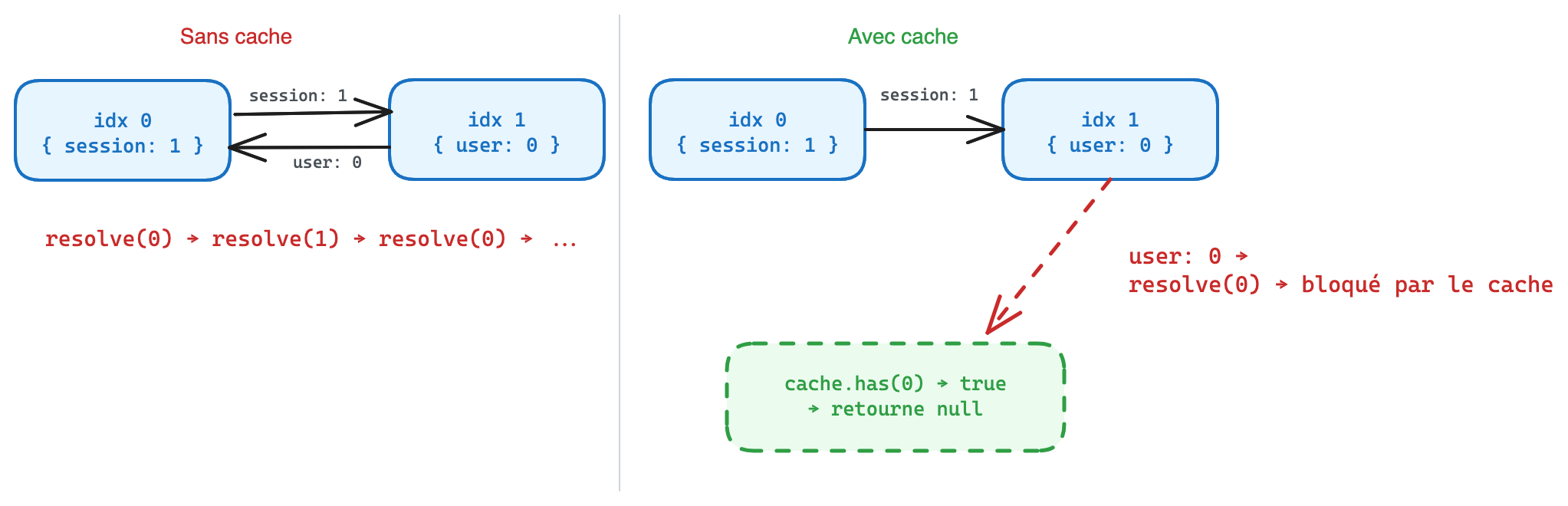
On a real app with Pinia stores, the format produces circular references. In the raw payload it looks like this:
[
  { "user": 1, "session": 2 },
  { "profile": 0, "name": 3 },
  { "token": 4, "user": 1 },
  "Alice",
  "abc123"
]
Index 0 references index 1, which references index 0. Without protection, the resolver loops forever.
The fix is a cache with a sentinel null written before resolution starts. If we hit the same index while we’re already resolving it, we return null instead of looping. Once resolution is done, we replace the sentinel with the real result.
const cache = new Map<number, unknown>();

function resolve(idx: number): unknown {
  if (cache.has(idx)) return cache.get(idx);
  cache.set(idx, null); // sentinel — breaks the loop if we come back here
  const val = raw[idx];
  // ... resolution ...
  cache.set(idx, result);
  return result;
}
On the payload from the freelance platform (whose name I’ll keep to myself), dozens of stores reference each other mutually. Without this, the parser blows up on the first few entries.
Tagged types — and what each app adds on top
devalue encodes certain JavaScript types as tagged arrays: the first element identifies the type, the rest are the arguments.
["Date", "2024-01-15"]
["Set", 1, 2, 3]
["RegExp", "foo", "gi"]
["BigInt", "123"]
These arrays live in the same flat array as everything else — mixed in with objects and primitives. To distinguish them from actual data arrays, devalue uses a convention: if the first element is a string, it’s a deserialization instruction, not a value. The string says what to build, the rest says what to build it with. The resolver checks this first.
For scalar values that can’t be represented in plain JSON, devalue uses negative indices inside objects:
{ "v": -1 }   →  { v: undefined }
{ "v": -3 }   →  { v: NaN }
{ "v": -4 }   →  { v: Infinity }
{ "v": -5 }   →  { v: -Infinity }
{ "v": -6 }   →  { v: -0 }
-2 is an empty slot in a sparse array ([1, , 3]), -7 marks the array itself as sparse. None of this is documented anywhere in Nuxt — you have to read devalue’s source to find it.
Nuxt layers its own types on top, for Vue’s reactivity wrappers:
["Ref", 7]
["ShallowReactive", 12]
["EmptyRef"]
["Ref", 7] means: a Vue ref() whose value is at index 7. For data extraction purposes, we don’t care about reactivity — we just resolve 7 directly.
And here’s where it gets interesting: each Nuxt app can define its own types. On the marketplace I was analyzing:
["Profile", 3]
["Experiences", 8]
["Appraisals", 15]
["SkillSet", 22]
Dozens of app-invented types, all serialized with the same mechanism. The second element is always an index pointing to the real value. A single default case in the resolver handles all of them without knowing them in advance:
default:
  // App-defined type — resolve the first argument
  return resolve(tag[1] as number)
This is what makes the parser generic: it works on any Nuxt app, even without knowing its domain-specific types.
Exploring the payload when you don’t know what’s in it
The first practical problem: on an unknown page, you don’t know which types exist or where the useful data is. The array might have 3,000 entries.
I added an inspect() method that scans the payload and surfaces two things:
const { tags, stores } = extractor.inspect();tags lists all the type names present in the payload:
['Appraisals', 'Date', 'EmptyRef', 'Experiences', 'Profile', 'Ref', 'SkillSet', ...]It’s the first thing to call on an unknown app — immediately shows you which domain types you can pull out with findByType.
stores returns resolved objects with more than 8 keys. Pinia stores are the densest flat objects in the payload — that’s the heuristic that holds up in practice.
Finding the Pinia stores in all of this
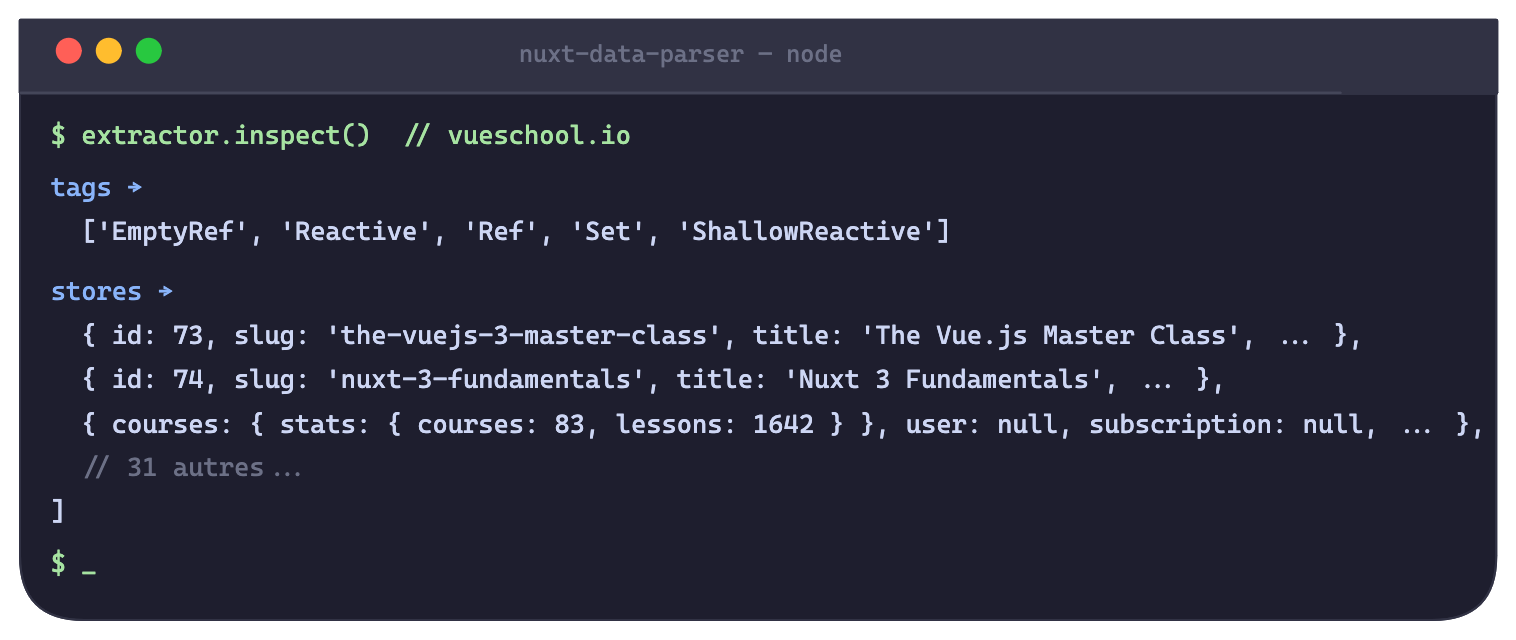
Pinia stores are serialized in the array like any other object — no explicit marker. No "_pinia" key, no header. They’re just there, indistinguishable from other objects until you resolve them.
What stores returns on the marketplace:
[
  { accessToken: null, userId: null, isLoggedIn: false, ... },       // session store
  { displayName: 'Alice', jobTitle: 'Dev full-stack', skills: [...] }, // profile store
  { results: [...], total: 48, filters: { ... } },                    // search store
  // ...
]
To target a specific store when you know its keys, duck typing:
const store = extractor.getPiniaStore(["displayName", "jobTitle", "skills"]);Result: the entire profile store state — no API, no authenticated session, straight from the HTML of a public page.
What I did with it
I packaged all of this into nuxt-data-parser, zero dependencies, browser + Node.
import { extractFromUrl } from "nuxt-data-parser";

const ex = await extractFromUrl("https://example.com/page");

// See what's available
const { tags } = ex.inspect();
// → ['Date', 'Experience', 'Profile', 'Ref', ...]

// Extract a specific type, fully typed
const profile = ex.findByType<MyProfile>("Profile");
const exps = ex.findAllByType<Experience>("Experience");

// Or resolve any index directly
const val = ex.resolve(42);
The package covers the full devalue format — built-in types, negative sentinels, TypedArrays, circular references, app-defined types. findByType<T> is generic, so the result is typed as long as you pass your interface.
If you’ve ever opened a Nuxt page source and seen that unreadable array — now you know what it is, and there’s a tool to read it.